At a glance
Use AI estimates as a starting point, then compare them with similar work you have completed. Include review time, dependencies and uncertainty, and adjust estimates using actual results.
1. Why Freelancers Struggle with Task Estimation
If you’ve ever told a client you’d need “a few hours” and then found yourself tweaking designs or rewriting copy deep into the night… you’re not alone.
Freelancers consistently underestimate how long things take. It’s not because we’re disorganized—it’s because creative work is complex, client expectations evolve, and interruptions are inevitable.
We forget to account for revisions, emails, tech hiccups, and energy dips. And without historical data or structure, we rely on gut instinct—which often leans optimistic.
That’s where AI comes in: not as a magic fix, but as a decision support tool that can bring clarity to the mess.
2. Can AI Really Help You Estimate Time More Accurately?
The short answer: yes—if you use it wisely.
AI task estimators are built to analyze patterns. Some use your past projects, others pull from a broader dataset of similar tasks. They can offer baseline estimates, detect scope complexity, and flag when a task might need more time than expected.
AI can also help you:
- Break big projects into smaller, estimate-ready chunks
- Spot bottlenecks in your workflow before they cause delays
- Visualize overlapping tasks or overbooked weeks
- Compare projected vs. actual time (so you improve over time)
But here's the catch: AI doesn’t know your working style, client quirks, or creative flow. That’s why it works best as a starting point, not the final say.
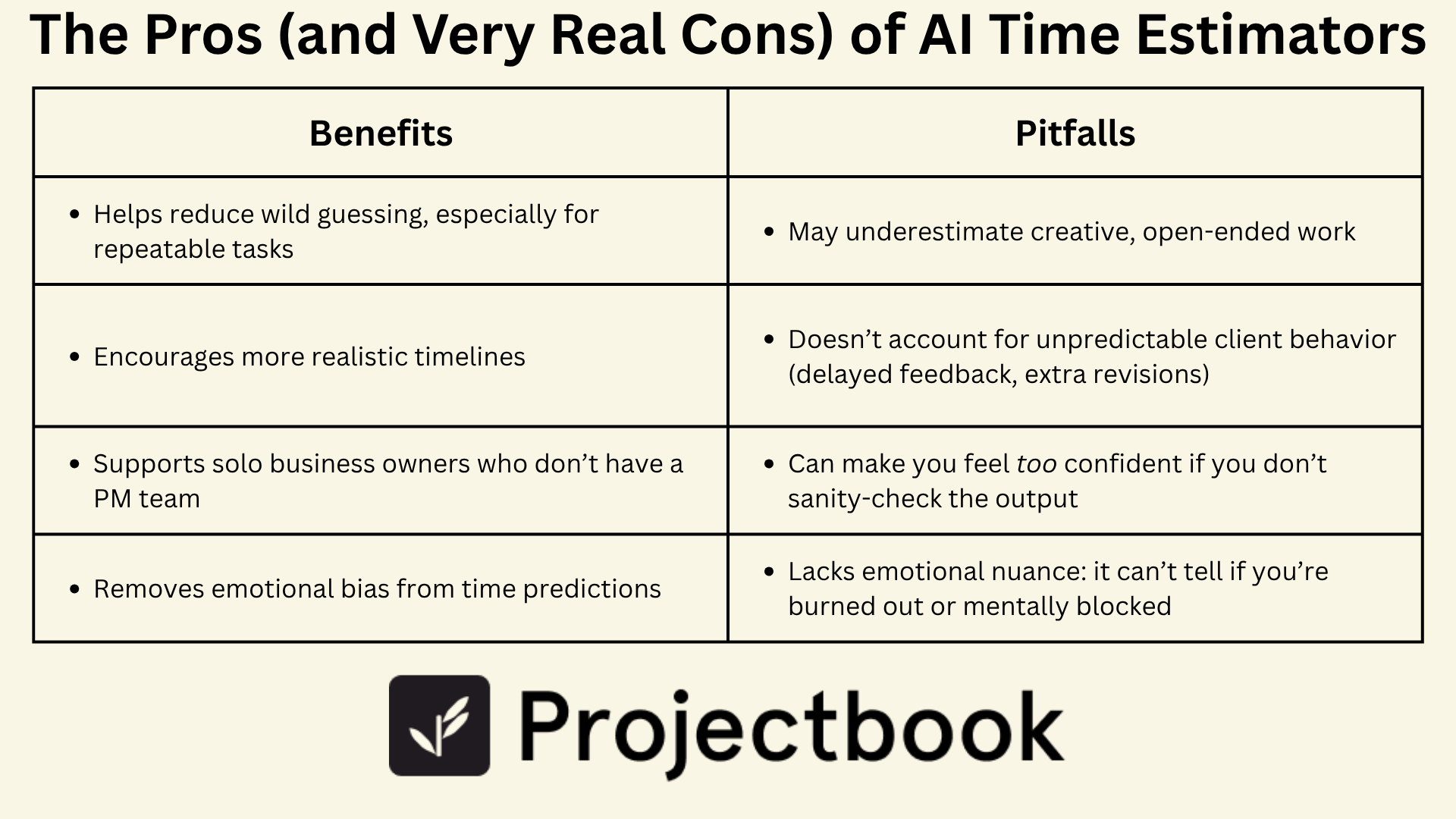
3. The Pros (and Very Real Cons) of AI Time Estimators
Let’s be honest: AI is great at sounding confident. But it’s only as good as the data and context it’s trained on.
Benefits:
- Helps reduce wild guessing, especially for repeatable tasks
- Encourages more realistic timelines
- Supports solo business owners who don’t have a PM team
- Removes emotional bias from time predictions
Pitfalls:
- May underestimate creative, open-ended work
- Doesn’t account for unpredictable client behavior (delayed feedback, extra revisions)
- Can make you feel too confident if you don’t sanity-check the output
- Lacks emotional nuance: it can’t tell if you’re burned out or mentally blocked
Used blindly, AI task estimators can create pressure to deliver faster than you should. But used with context? They’re powerful.
4. How to Use AI Task Estimation the Right Way
Here’s a workflow that blends AI suggestions with real-life experience:
1. Feed it context
If you’re using an AI planning tool, be specific. Tell it how many stakeholders are involved, how much of the work is original vs. templated, and how long past versions of this task took.
2. Use it to create ranges, not promises
Instead of expecting a perfect time number, use AI to give you a realistic range. For example: “This kind of task usually takes 4–6 hours,” not “It’ll be done in 3.”
3. Pad for margin
Once AI gives you an estimate, add 20–30% for the inevitable: feedback delays, tech problems, human energy levels. Buffer time isn’t a failure—it’s a smart strategy.
4. Compare predicted vs. actual regularly
Use AI’s predictions as a learning tool. At the end of a project, look back. Did it overestimate? Underestimate? Adjust your process based on your patterns.
5. Don’t forget to adjust based on energy and focus
The same task might take you two hours on a clear-headed Monday and five on a distracted Friday. AI doesn’t know that—but you do. Always factor in your own rhythms.
5. Blending Human Experience With AI Predictions
AI is amazing at helping you spot blind spots. But it still needs a partner—you—to ground its predictions in reality.
You know:
- How long it takes you to write, revise, and polish
- How fast a client really gives feedback
- Whether you’re juggling two other projects this week
- How often you end up saying “sure, one more revision”
The best estimators are collaborative. Let AI do the pattern-matching, and let your experience layer in the nuance.
6. How ProjectBook.co Supports Smarter Estimation
At ProjectBook, we’ve seen how freelancers lose time and trust when estimation fails—and we’ve designed tools to help you plan better without pressure.
Here’s how we help you use AI estimation with structure:
- Break projects into smart, modular phases so AI can estimate better
- Tag tasks by type, effort level, or status so you track where time actually goes
- Compare your past task durations with new ones
- Create project templates with built-in, realistic time blocks
- Use buffers and internal vs. external deadlines to avoid crunch-mode burnout
With ProjectBook, you don’t need to trust AI blindly—you build a workflow that uses its strengths and honors your own.
7. FAQ: AI in Freelance Task Planning
How accurate is AI task estimation, really?
Pretty good—especially for repetitive or structured work. But for creative or client-variable projects, it’s best used as a baseline, not a promise.
Can I use AI for estimating brand-new services?
Yes, but combine it with your gut and research. If you haven’t done the work before, AI can help forecast—but your own time-tracking will be the best long-term teacher.
Should I show clients AI-based time estimates?
You can! Just frame them as professional ranges—not hard deadlines. “This typically takes X–Y hours” builds confidence without painting yourself into a corner.
Does ProjectBook use AI?
Yes—and we’re expanding that soon. Our current tools help you plan repeatable timelines and track actual task time, and our roadmap includes smarter AI integrations to support better forecasting without overpromising.
Final Word
Task estimation is one of the trickiest parts of freelancing—but it doesn’t have to be a guessing game forever.
When you use AI wisely—as a guide, not a guarantee—you start to plan with more clarity, communicate with more confidence, and deliver without the stress spiral.
You’re not a robot. You’re a human building a sustainable business.
Let AI help—but let you lead.
And with ProjectBook.co, you’ll always have the structure, space, and smart tools to estimate, adjust, and grow with confidence.
From ideas to a clearer week